Quote print-quantity columns
Menu: Sales → Quote
Manage Quotes
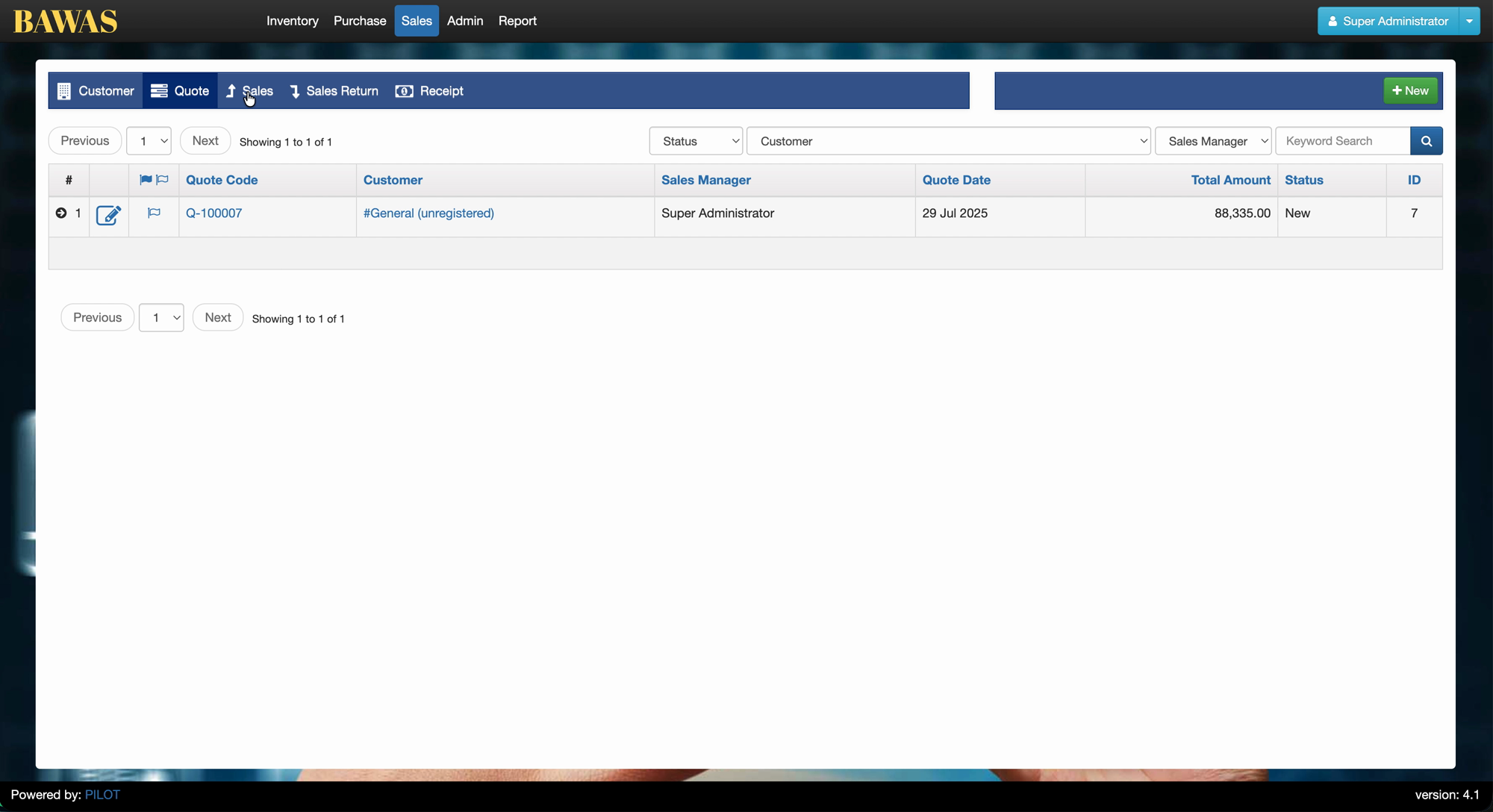
Sub-tabs under Sales include Customer, Quote, Sales, Sales Return, and Receipt. On Quote, the list shows Quote Code, Customer, Sales Manager, Quote Date, Total Amount, and Status. Use Status and Customer filters plus Keyword Search, then + New to create a quote.
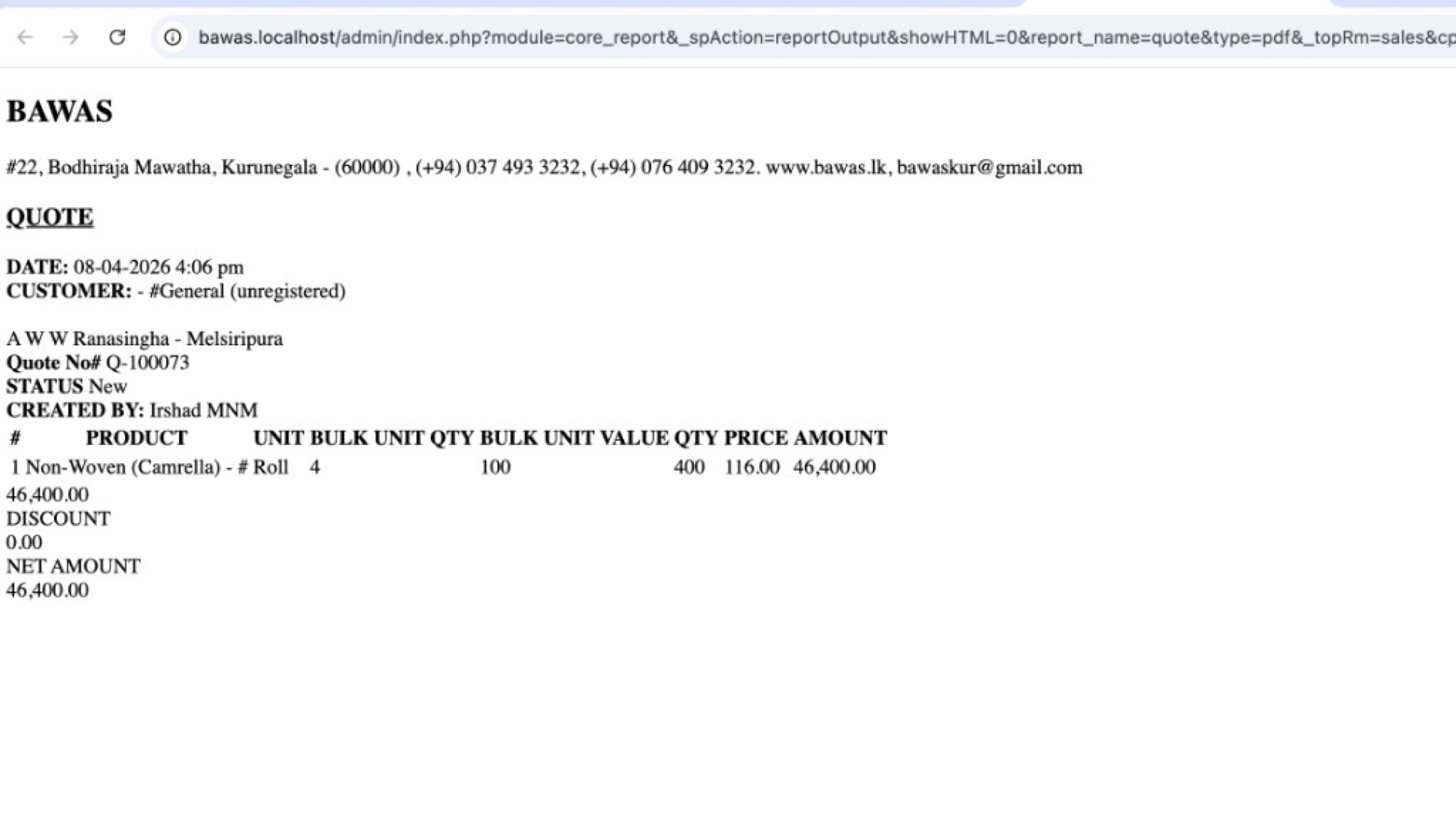
[BAWAS] Quote Print: Fix Quantity Column Content-completed. QUOTE PDFs now show quantity breakdown columns with correct values: UNIT, BULK UNIT, QTY BULK UNIT, and VALUE QTY, so roll/bulk lines read clearly (for example 4 rolls × 100 per roll = 400 value qty).
Quotes for fabric and bulk products need more than a single quantity number. Staff and customers must see unit type, bulk count, per-bulk quantity, and the calculated total quantity before price and amount.
Special features
- QUOTE header: company details, date, customer, quote no., status, created by.
- Line table columns: #, PRODUCT, UNIT, BULK UNIT, QTY BULK UNIT, VALUE QTY, PRICE, AMOUNT.
- VALUE QTY = bulk unit count × qty per bulk unit (for example 4 × 100 = 400).
- PRICE and AMOUNT use value qty × unit price (for example 400 × 116.00 = 46,400.00).
- Footer totals: subtotal, DISCOUNT, NET AMOUNT.
- Report output via
report_name=quote(core_report/reportOutput).
Workflows
Verify quantity columns on a quote that uses roll or bulk units.
Steps
- Open Sales → Quote and open or create a quote (for example Q-100073).
- Add a line with roll/bulk unit setup (for example Non-Woven (Camrella) in Roll).
- Enter bulk unit count and qty per bulk unit on the quote line.
- Save the quote while status is New.
- Print or open the quote PDF (
report_name=quote). - Confirm UNIT, BULK UNIT, QTY BULK UNIT, and VALUE QTY match the screen.
- Confirm AMOUNT and NET AMOUNT match quote totals.
- Re-print after line changes.
Validation rules
| Rule | Detail |
|---|---|
| UNIT | Shows top unit (for example Roll, Mtr, Nos) |
| BULK UNIT | Number of bulk units (for example 4 rolls) |
| QTY BULK UNIT | Quantity per one bulk unit (for example 100 per roll) |
| VALUE QTY | Should equal bulk unit × qty bulk unit (for example 400) |
| Amount | VALUE QTY × PRICE should match line AMOUNT |
| Quote ref | Quote No# on PDF must match record (for example Q-100073) |
| Product master | Wrong columns often mean incorrect unit setup in Inventory |
Quote Details
Related — QUOTE print quantity columns
QUOTE Q-100073 dated 08-04-2026 for #General (unregistered), A W W Ranasingha - Melsiripura, status New, created by Irshad MNM. Line Non-Woven (Camrella) - # shows:
| Column | Value |
|---|---|
| UNIT | Roll |
| BULK UNIT | 4 |
| QTY BULK UNIT | 100 |
| VALUE QTY | 400 |
| PRICE | 116.00 |
| AMOUNT | 46,400.00 |
NET AMOUNT 46,400.00 with DISCOUNT 0.00.
Staff can confirm 400 value qty is 4 × 100 before sending the quote to the customer.