Quote print-quantity columns
Overview
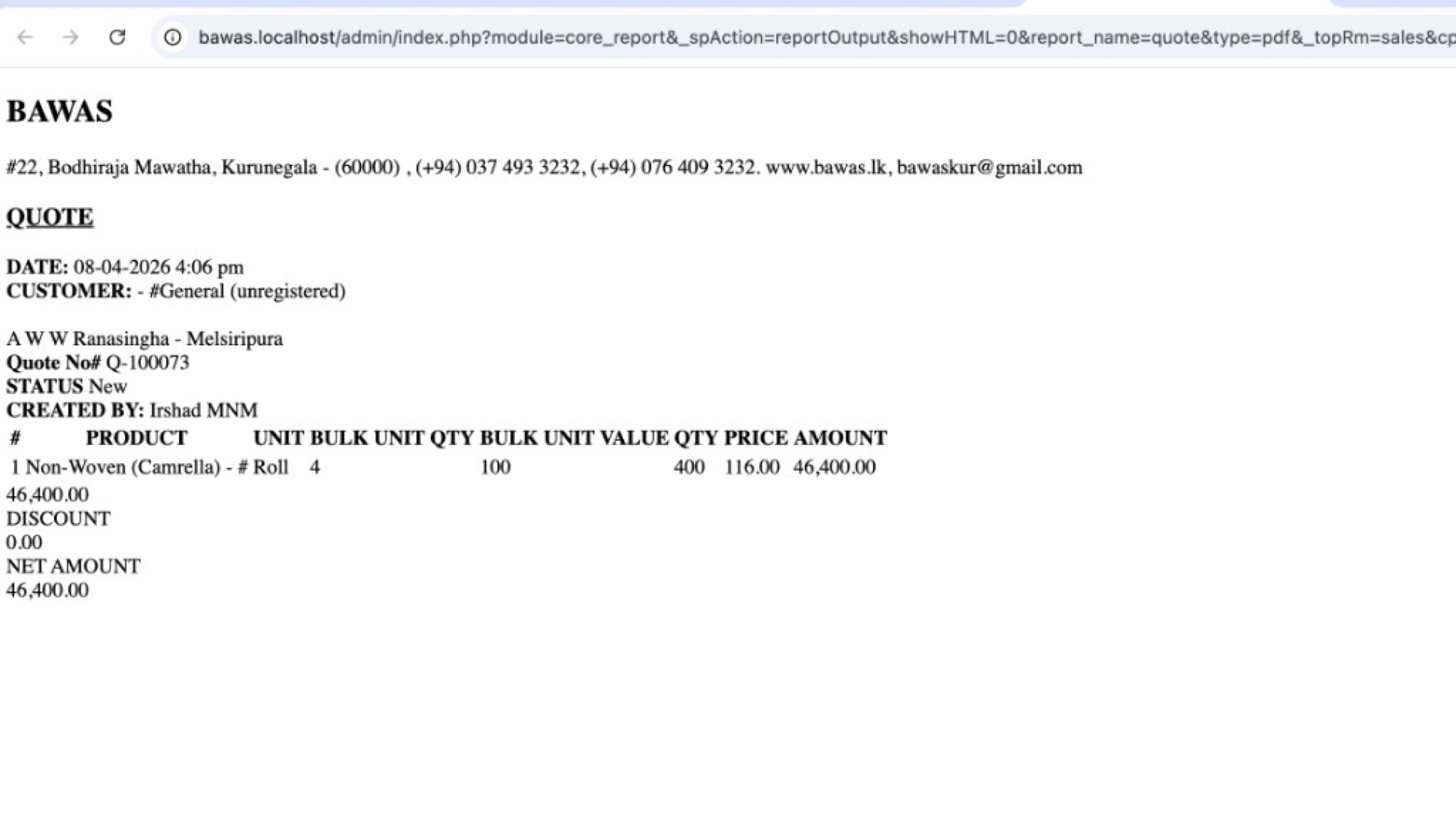
[BAWAS] Quote Print: Fix Quantity Column Content-completed. QUOTE PDFs now show quantity breakdown columns with correct values: UNIT, BULK UNIT, QTY BULK UNIT, and VALUE QTY, so roll/bulk lines read clearly (for example 4 rolls × 100 per roll = 400 value qty).
Purpose
Quotes for fabric and bulk products need more than a single quantity number. Staff and customers must see unit type, bulk count, per-bulk quantity, and the calculated total quantity before price and amount.
Features
- QUOTE header: company details, date, customer, quote no., status, created by.
- Line table columns: #, PRODUCT, UNIT, BULK UNIT, QTY BULK UNIT, VALUE QTY, PRICE, AMOUNT.
- VALUE QTY = bulk unit count × qty per bulk unit (for example 4 × 100 = 400).
- PRICE and AMOUNT use value qty × unit price (for example 400 × 116.00 = 46,400.00).
- Footer totals: subtotal, DISCOUNT, NET AMOUNT.
- Report output via
report_name=quote(core_report/reportOutput).
Workflow
Verify quantity columns on a quote that uses roll or bulk units.
Steps
- Open Sales → Quote and open or create a quote (for example Q-100073).
- Add a line with roll/bulk unit setup (for example Non-Woven (Camrella) in Roll).
- Enter bulk unit count and qty per bulk unit on the quote line.
- Save the quote while status is New.
- Print or open the quote PDF (
report_name=quote). - Confirm UNIT, BULK UNIT, QTY BULK UNIT, and VALUE QTY match the screen.
- Confirm AMOUNT and NET AMOUNT match quote totals.
- Re-print after line changes.
Validation Rules
| Rule | Detail |
|---|---|
| UNIT | Shows top unit (for example Roll, Mtr, Nos) |
| BULK UNIT | Number of bulk units (for example 4 rolls) |
| QTY BULK UNIT | Quantity per one bulk unit (for example 100 per roll) |
| VALUE QTY | Should equal bulk unit × qty bulk unit (for example 400) |
| Amount | VALUE QTY × PRICE should match line AMOUNT |
| Quote ref | Quote No# on PDF must match record (for example Q-100073) |
| Product master | Wrong columns often mean incorrect unit setup in Inventory |
Screenshot-quote PDF quantity columns
Overview
QUOTE Q-100073 dated 08-04-2026 for #General (unregistered), A W W Ranasingha - Melsiripura, status New, created by Irshad MNM. Line Non-Woven (Camrella) - # shows:
| Column | Value |
|---|---|
| UNIT | Roll |
| BULK UNIT | 4 |
| QTY BULK UNIT | 100 |
| VALUE QTY | 400 |
| PRICE | 116.00 |
| AMOUNT | 46,400.00 |
NET AMOUNT 46,400.00 with DISCOUNT 0.00.
Staff can confirm 400 value qty is 4 × 100 before sending the quote to the customer.
Related documentation
- Inventory-product units and bulk unit setup
- Sales-edit transaction-similar line qty behaviour on sales
- Purchase print-align unit with sales format-unit display on purchase PDFs
Summary
Quote print quantity column content is fixed so bulk/roll lines show UNIT, BULK UNIT, QTY BULK UNIT, and VALUE QTY correctly. If values look wrong, check the product’s unit configuration in Inventory, then re-print the quote.