Purchase print-align unit with sales format
Overview
[BAWAS] Purchase Print: Align Unit with Sales Format-completed. Purchase ORDER and PURCHASE INVOICE prints now show quantity and unit the same way as sales printouts: bill-unit quantity when available (for example 5) and a compact unit label (for example Roll(50Mtrs)) instead of only the base metre total.
Purpose
Warehouse and accounts staff should read the same unit meaning on purchase PDFs as on sales PDFs—especially for roll/bulk products—so qty, unit, price, and amount lines are easy to check against the purchase screen and goods received.
Features
- Print Large and Print Mini from the purchase edit screen.
- Large print: PRODUCT, QUANTITY, UNIT, PRICE, AMOUNT columns (sales-style table).
- Mini print: ITEM, QTY, UNIT on a compact receipt layout.
- Bill-unit rows use
bill_unit_nofor quantity andtop_unit_type(bill_unit_value + bill_unit_type)for unit text when bill unit data exists. - Top-unit-only rows still show the product’s primary unit (for example Mtr, Nos).
- Header: supplier (TO / supplier name), ref no., date, status, operator, totals.
Workflow
Verify on a purchase that uses roll or conversion units (for example Heel PVC 010).
Steps
- Open Purchase and edit a purchase (for example P-100020).
- Confirm line items and units on the Purchase Items grid match Inventory setup.
- Click Print Large for the full ORDER PDF or Print Mini for the narrow receipt.
- On large print, check QUANTITY and UNIT on each line (for example qty 5, unit Roll(100Pair) style).
- On mini print, check QTY and UNIT match the same logic as large print.
- Confirm PRICE and AMOUNT still match the purchase total before sending to the supplier.
- Re-print after changing qty, unit, or product master data.
Validation Rules
| Rule | Detail |
|---|---|
| Bill-unit products | Quantity should reflect bill units (rolls/packs), not only base metres when bill unit is set |
| Unit label | Compact form Roll(50Mtrs) (or Roll (100 Pair) where spacing is used) aligned with sales print rules |
| Large vs mini | Same product line should read consistently on both print sizes |
| Variant / size | Variant text (for example 500/D/MN-11) may appear in qty or product area per product setup |
| Ref no. | Print ref (for example P-100020) must match the purchase record |
| Totals | NET AMOUNT / balance must match purchase entry after discount |
Screenshot-purchase edit and print actions
Overview
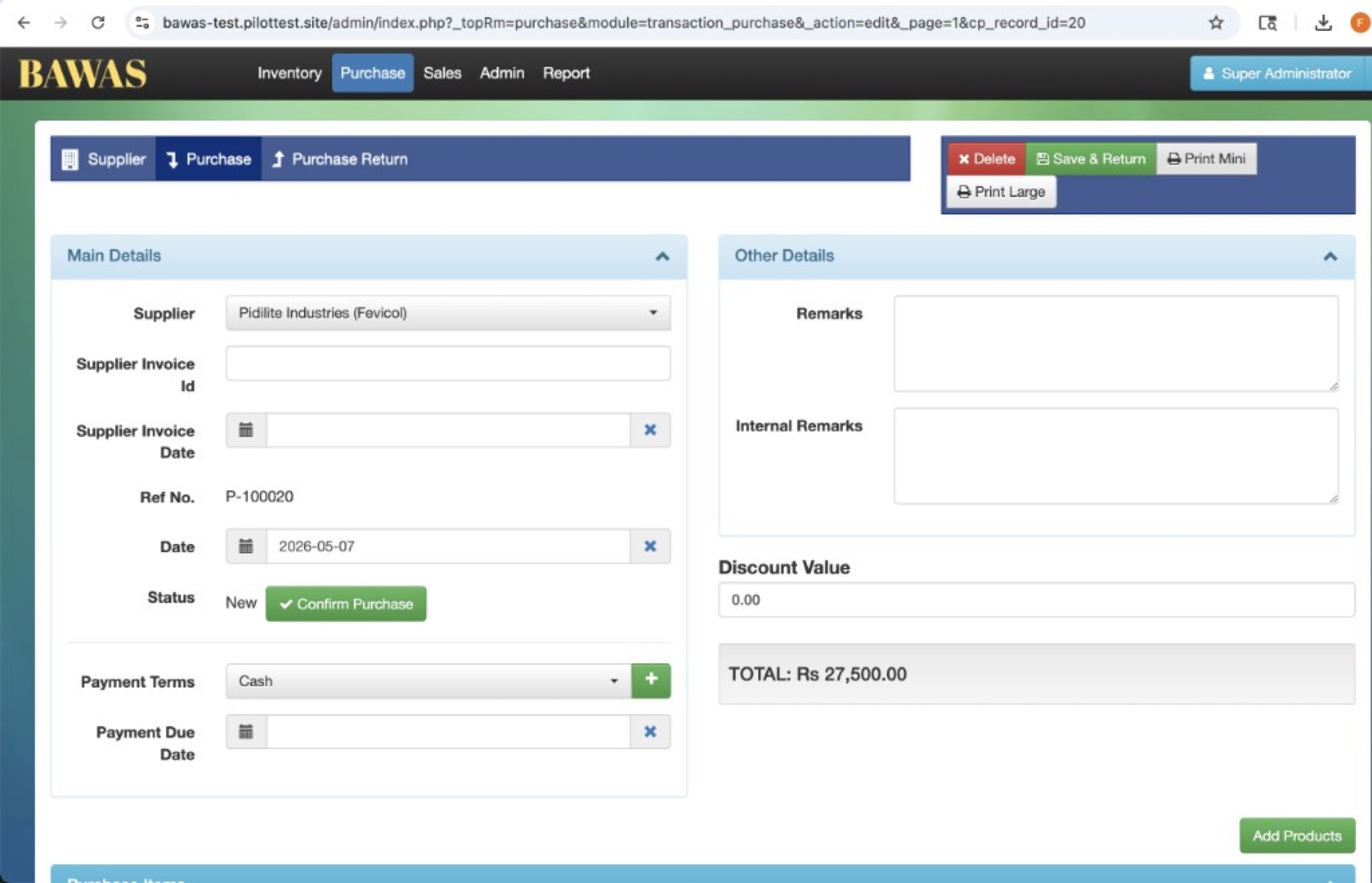
Purchase P-100020 for supplier Pidilite Industries (Fevicol) on 2026-05-07, status New, total Rs 27,500.00. Use Print Mini for the receipt-width layout or Print Large for the full column layout before confirming the purchase.
Screenshot-Print Large (ORDER layout)
Overview
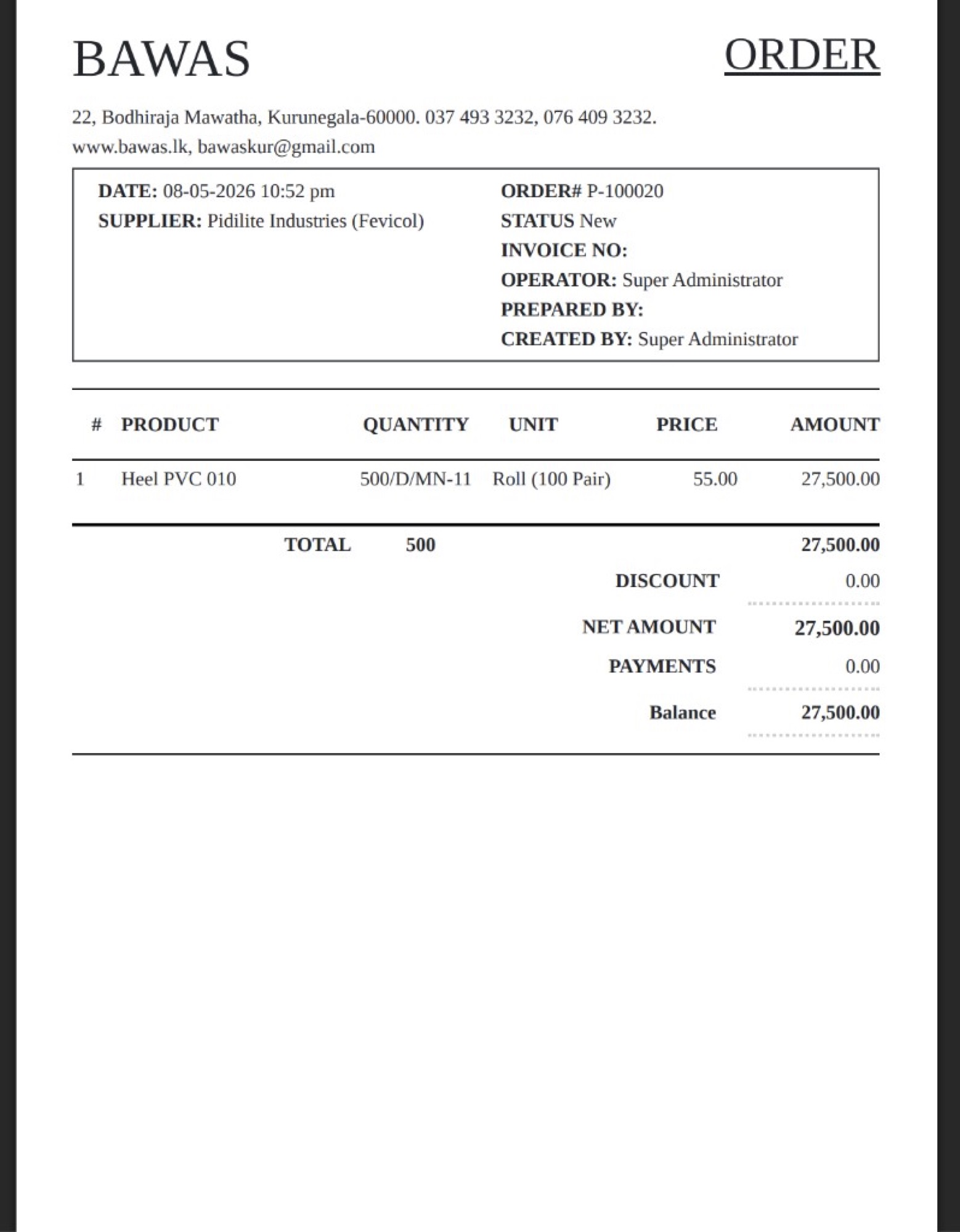
ORDER P-100020 dated 08-05-2026 for Pidilite Industries (Fevicol). Line Heel PVC 010 shows QUANTITY, UNIT (Roll (100 Pair)), PRICE 55.00, and AMOUNT 27,500.00 in the same table style as sales ORDER print. Totals: NET AMOUNT 27,500.00, Balance 27,500.00.
Staff can confirm roll-based lines use the sales-aligned unit display instead of metre-only text when the product is billed by roll.
Screenshot-Print Mini (compact layout)
Overview
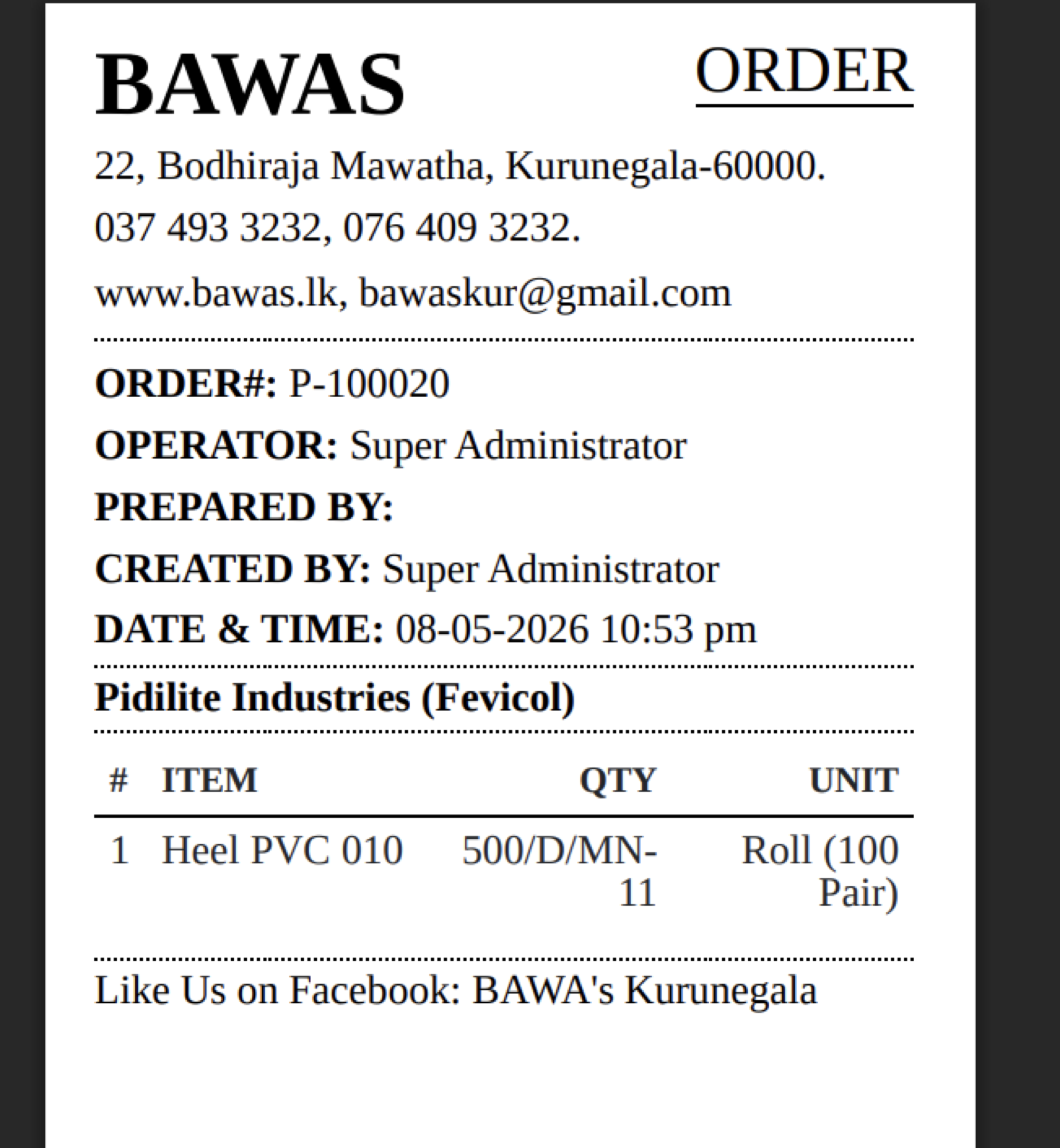
Mini ORDER for the same purchase P-100020: Heel PVC 010 with QTY and UNIT Roll (100 Pair) on the narrow layout. Use this for quick checks at the counter or when emailing a compact copy to the supplier.
Expected line format (reference)
For roll/bill-unit items, the intended readable pattern matches sales print logic:
[Product]-[Qty] [Unit(conversion)]-[Price]-[Amount]
Example (invoice-style row):
Oxford Royal - 5 Roll(50Mtrs) - 547.05 - 136,762.50
On the PDF this is split across PRODUCT, QUANTITY, UNIT, PRICE, and AMOUNT columns (large print) or ITEM, QTY, UNIT (mini print).
Related documentation
- Inventory-product units and bill units
- Variants and short print-variant text on print lines
- Sales print-phone and mobile-sales ORDER customer box layout
Summary
Purchase print unit display is aligned with sales format on both Print Large and Print Mini. If a line still shows the wrong unit, update the product’s Units & Measurements in Inventory, then re-print the purchase.