Receipt-allocation
Overview
[BAWAS] Receipt: Distribution Rules for Partial Amount Allocation-completed. When you receive payment on a Transaction Receipt, you can spread the amount across Pending Invoices using Distribute Pending Invoices or Add +, including partial paying amounts on an invoice (less than the full due). For Remaining Amount to Apply, exceeding-payment alerts, and the Partial Payment dialog, see Receipt-payment alert and remaining.
Purpose
Reconcile customer payments with open invoices and credit balance, and apply rules so distribution respects due amounts and leaves correct balances when not every invoice is paid in full.
Features
- Status New with Confirm Receipt when ready to post.
- Pending Invoices list with Total, Due Amount, and Add + per row.
- Distribute Pending Invoices to auto-apply payment by rules.
- Invoices table with editable Paying Amount per row.
- Amount Applied, Customer Credit Used Amount, Remaining Amount to Apply.
- Credit Balance and Used Amount For This Receipt.
- Payments lines and Total Payment (on confirmed receipts).
Workflow
Use distribution when the customer pays one lump sum that should cover several invoices, including part-payment on one invoice.
Steps
- Open Sales → Receipt and create or open a receipt (status New).
- Enter Payments so Total Payment matches cash received (or use credit).
- Review Pending Invoices and the pending total (for example 1,400.00).
- Click Distribute Pending Invoices or Add + on specific rows.
- Adjust Paying Amount on each invoice row (full or partial).
- Check Amount Applied and Remaining Amount to Apply (should be 0.00 when fully distributed).
- Click Confirm Receipt when totals are correct.
- On confirmed receipts, review allocation read-only; use your correction process if something was wrong.
Validation Rules
| Rule | Detail |
|---|---|
| Paying vs due | Paying Amount on a row must not exceed that row’s Due Amount |
| Partial pay | Paying amount may be less than due (for example 400.00 on 450.00 due) |
| Amount applied | Sum of Paying Amount rows equals Amount Applied |
| Remaining | Remaining Amount to Apply is 0.00 when all payment is allocated |
| Distribution | Distribute Pending Invoices follows partial-allocation rules in order |
| Credit | Customer Credit Used Amount must not exceed Credit Balance |
| Confirm | Ledger impact usually only after Confirm Receipt |
Screenshot-partial distribution on new receipt
Overview
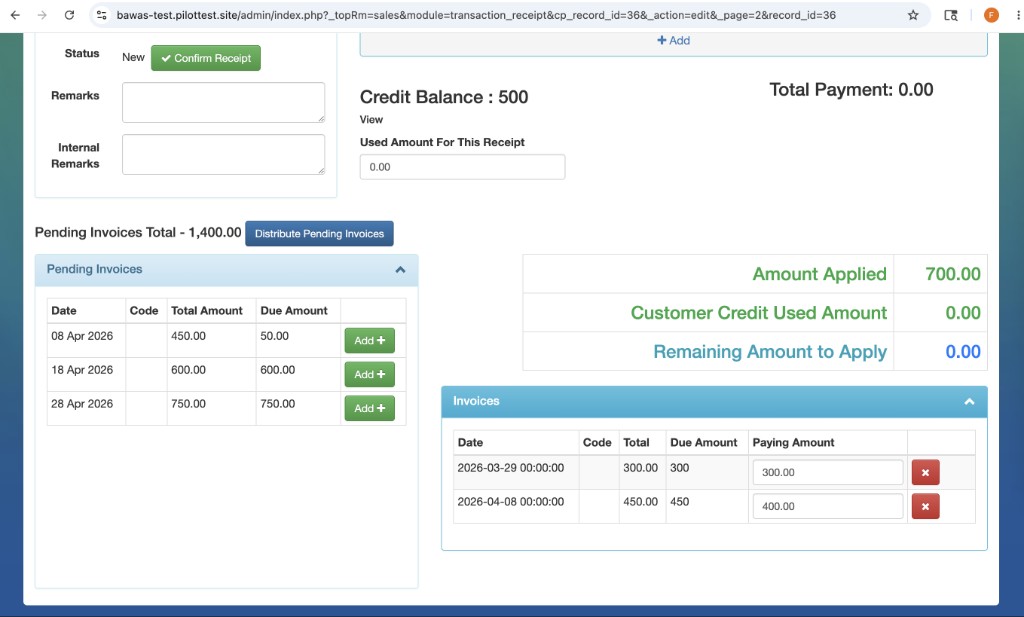
Receipt is New with Credit Balance 500 and Pending Invoices Total 1,400.00. Distribute Pending Invoices has applied 700.00 as Amount Applied; Remaining Amount to Apply is 0.00.
In Invoices, one line is paid in full (300.00 on 300 due). The next line is partial: 400.00 Paying Amount against 450.00 due, leaving 50.00 still due on that invoice. Pending list on the left still shows open items (for example 50.00, 600.00, 750.00 due) for later receipts.
This is the completed behaviour: distribution rules allow splitting one receipt across invoices without forcing full payment on every line.
Screenshot-confirmed receipt
Overview
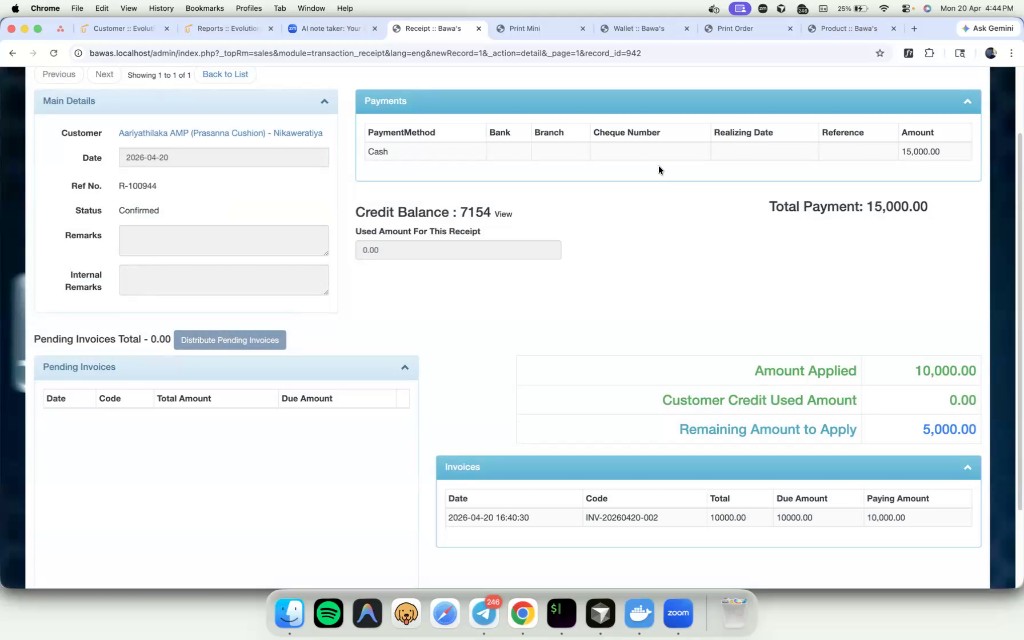
Confirmed receipt R-100944 shows 15,000.00 received, 10,000.00 applied to invoices, and 5,000.00 Remaining Amount to Apply when not all cash was allocated. Use this view after Confirm Receipt to audit posted allocations.
Summary
Receipt allocation ties payments to invoices, including partial amounts per invoice. Use Distribute Pending Invoices for rule-based splits, then confirm when Remaining Amount to Apply is zero. For creating receipts, see Receipt-creation; for customer credit, see Admin-wallet.