Inventory-product variants
Overview
[BAWAS] Stock: Fix Update & Variant Issues-completed. Inventory → Product → Variants defines sellable combinations (size, colour, code, sale price) for a base stock item. Saving the product and editing variant rows now persists correctly without dropped updates or broken active flags.
Purpose
Let stock and sales teams maintain variant-level pricing and availability without creating duplicate base products, and trust that Save updates every variant row.
Features
- Variant grid: Code, Size, Colour, Sale Price, Active flag.
- Per-row edit and delete actions.
- + Add for single variants; BULK CREATE for many at once.
- Main, Variants, Suppliers, and Stock History tabs on the product.
- Save, Save & Return, and Delete on the product header.
- Inactive variants stay off sales lines but remain on the grid for history.
Workflow
Each variant is a row tied to one base product. Active variants appear in Sales and Purchase line pickers and on printouts. On sales orders, use Variant product selection to add several variants in one step from Add Products.
Steps
- Open Inventory → Product and select a product (for example 100002: Sole Gents 0173).
- Open the Variants tab.
- Click + Add or BULK CREATE to add rows.
- Enter Code, Size, Colour, Sale Price, and tick Active when the variant is sellable.
- Use the green edit icon or row X to change or remove a variant when needed.
- Click Save or Save & Return on the header.
- Re-open the product and confirm codes, prices, and Active checkboxes match what you saved.
- Confirm active variants appear on new sales lines and on Variants-short print when used on orders.
Validation Rules
| Rule | Detail |
|---|---|
| Unique variant code | Code must not duplicate another variant on the same product (for example 100002-38) |
| Sale price | Must be a valid positive decimal where required |
| Active flag | Unchecked rows (for example sizes 44, 45) must not appear as sellable variants |
| Product save | Header Save must persist all variant grid changes |
| Re-open check | After save, variant list must match last edit (no revert or missing rows) |
| Bulk create | BULK CREATE must add rows that save with the same rules as + Add |
Screenshot Section
Overview
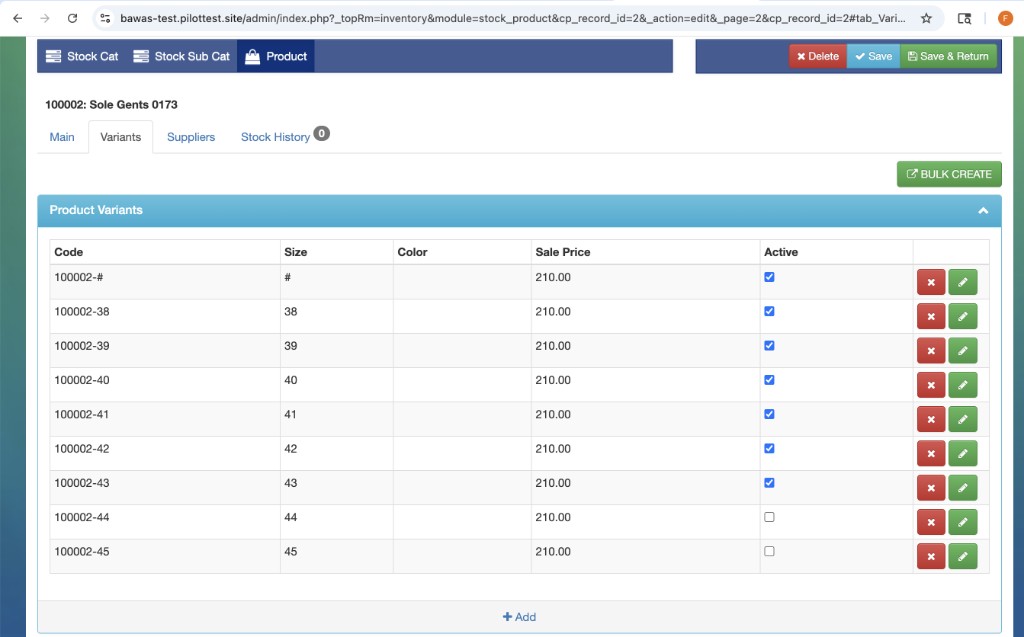
Product 100002: Sole Gents 0173 on Inventory → Product → Variants. Rows use codes 100002-38 through 100002-45, Sale Price 210.00, and Active checked for sizes # through 43 while 44 and 45 are unchecked. BULK CREATE and + Add sit ready for more rows; each line has edit and delete actions.
This screen is where the stock update and variant fix applies: staff can change prices or active status, save once, and see the same data when they return. Variant codes here feed sales qty display (for example 1/38, 1/39 on order S-324090 in Variants-short print).
Summary
Variants link stock master data to sales line items and print. Keep codes stable and prices current; after any bulk edit, save and re-open the Variants tab to confirm the fix before high-volume selling.